What an AI receptionist costs in India
Last updated 2026-11-01 · by Venu Gopal Reddy Muvva, founder
Your first 3 months are free. After that, you pay only for what you use at our cost. A phone minute costs about ₹2.13 on Exotel, and web chat is free.
Steps
- Start free sign-up. Go to the sign-up page and press Start free. Your 90-day free period begins immediately without a card.
- Set-up page with templates. Pick your business type, such as clinic or salon, and add your hours and services to your agent.
- Test call page with Start voice call. Press Start voice call to talk to your receptionist. These test calls are free and use your browser microphone.
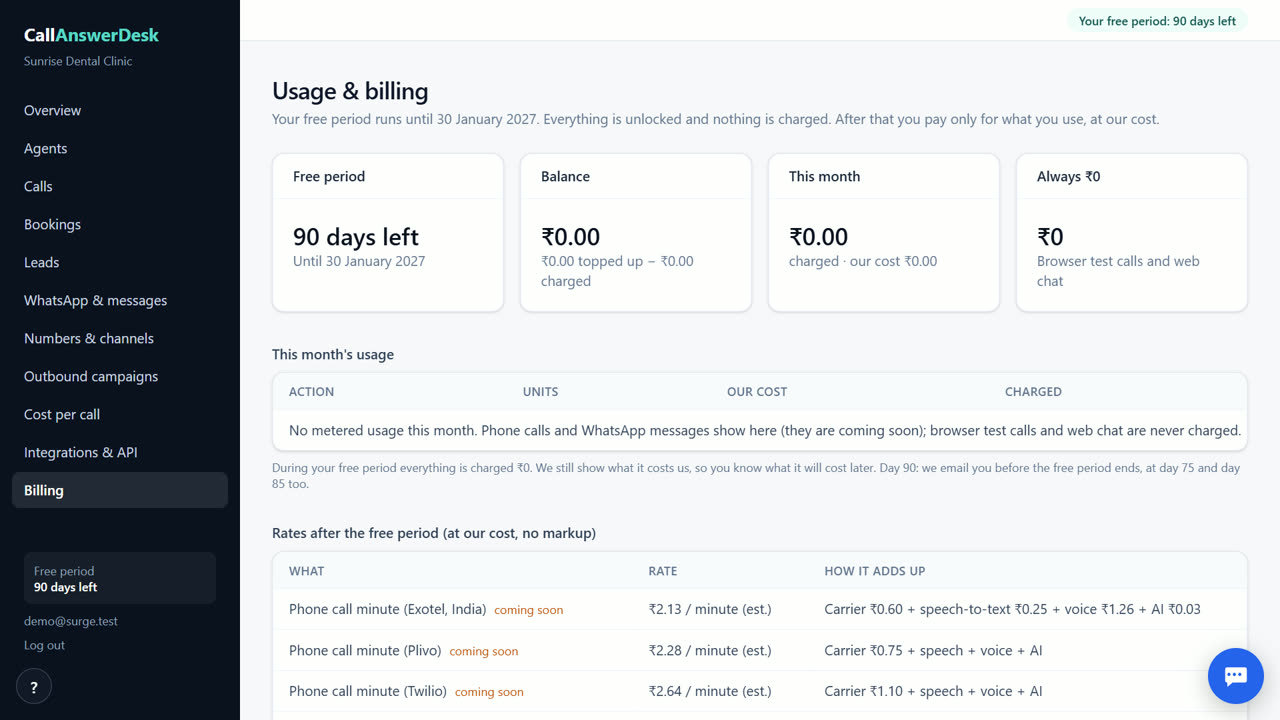
- Usage & billing. Check the Usage & billing page to see your days left in the free period and your current balance.
The first three months are free
You get 90 days of free access from the day you sign up. During this time, nothing is charged for any feature. This includes phone minutes and WhatsApp messages once those features are live. You do not need to enter a card to start. The app shows a banner and sends emails on day 75, 85, and 90 to remind you that the free period is ending. This gives you enough time to set up your receptionist and test it thoroughly before any costs apply.
Pricing after the free period
After 90 days, you pay only for what you use at our cost. There is no subscription fee. A phone call minute on Exotel costs about ₹2.13. This covers the carrier, speech-to-text, voice, and AI costs. WhatsApp messages cost about ₹0.12 each. Browser test calls and web chat conversations are free because we carry those costs. Phone numbers and WhatsApp are not available yet, so you will not be charged for them today. Prices exclude GST in India.
A worked example for 300 minutes
Suppose your business gets 300 minutes of phone calls in a month. At about ₹2.13 per minute on Exotel, the total cost is roughly ₹640. If you also send 100 WhatsApp messages, that adds about ₹12. Your total for the month would be around ₹652. You pay from a prepaid balance, which you top up with packs of ₹200, ₹500, ₹1,000, or ₹2,000. This is much lower than the cost of hiring a part-time receptionist, who would require a monthly salary and benefits.
How to pay and manage balance
You pay using a prepaid balance. Top-ups are available through Razorpay for Indian users and Stripe for others. You can choose packs of ₹200, ₹500, ₹1,000, or ₹2,000. Payments are made on a secure hosted page, and you receive an emailed receipt. If your balance runs out, incoming calls are still answered, but outbound calls wait until you top up. The Usage & billing page shows your current balance and usage history so you can track spending easily.
When CallAnswerDesk is not the right tool
CallAnswerDesk is not right if you need real phone calls answered on your own number today, as that feature is coming soon. It is also not suitable if you require WhatsApp replies immediately, which is not available yet. If you need live transfer to staff or call recording, those are not available. If you need support for Indian languages like Hindi or Tamil, the system currently works in English only. For these needs, you may need a different tool until these features are live.
Questions
Is CallAnswerDesk free forever?
No. It is free for the first 3 months. After that, you pay only for what you use at our cost.
What does a phone minute cost after the free period?
A phone minute costs about ₹2.13 on Exotel, which is an estimate of our actual carrier and AI costs.
Do I have to pay for web chat?
No. Web chat conversations are free. We carry the AI cost for you.
How do I pay for usage after the free period?
You pay from a prepaid balance. You can top up with packs of ₹200, ₹500, ₹1,000, or ₹2,000 via Razorpay.
Related
Free for your first 3 months. Then pay only for what you use.
Start free — 3 months on us