AI receptionist for clinics
Last updated 2026-11-01 · by Venu Gopal Reddy Muvva, founder
CallAnswerDesk uses a clinic template to book patients into its own calendar and answer questions about fees and hours. It sends you an email for every new booking or message so you never miss a patient.
Steps
- Start free sign-up. Go to /signup and press "Start free — 3 months on us". Enter your name, email, and password. No card is needed.
- Set up the clinic. On the set-up page, pick the Clinic template. Add your business name, hours, services, and fees. You can also add FAQs about insurance or reports.
- Test the receptionist. Press "Start voice call" or "Type instead" on the test page. Ask about your hours or book a slot to see how it works. Test calls are free.
- Add to your website. Open Numbers & channels to copy the script tag. Paste it into your website so visitors can chat with your receptionist.
- Review conversations. Check the Conversations and Bookings pages to see who called and what they need. You will receive an email for each new booking.
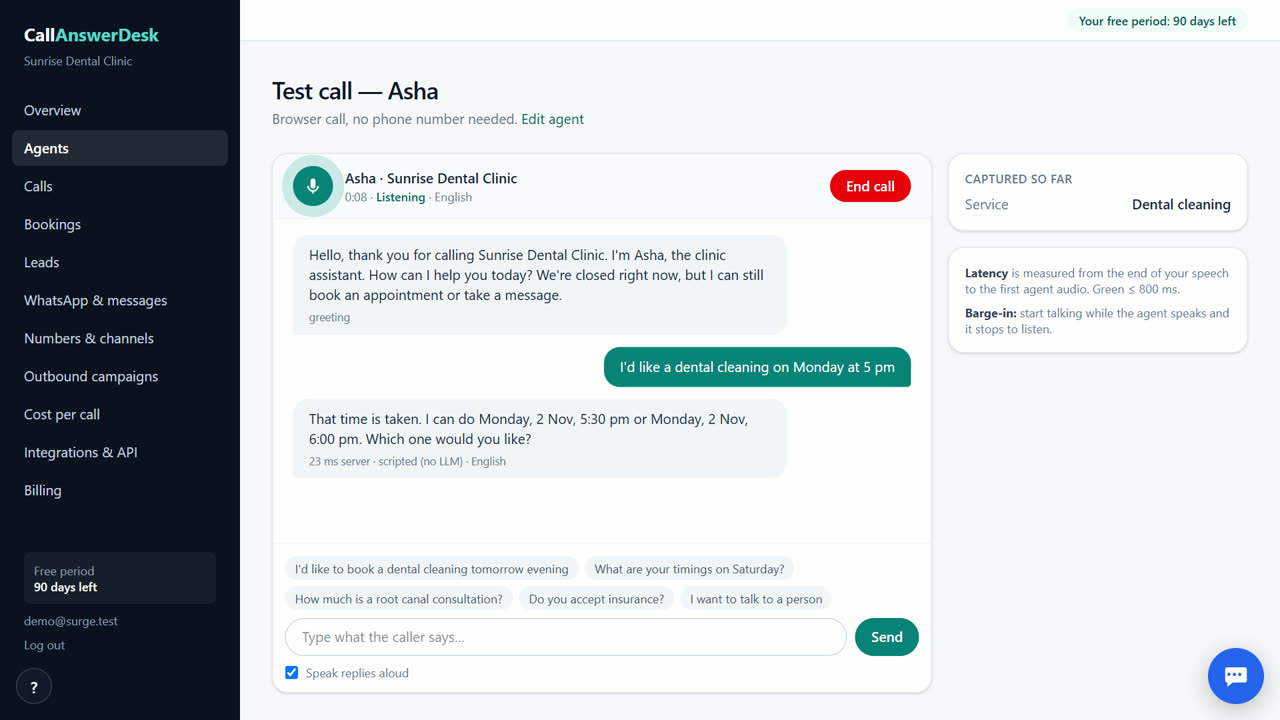
Book patients without a front desk
The AI receptionist checks your built-in calendar for open slots. It offers the next few free times to the patient and confirms the booking before saving it. If the patient’s time is busy, it suggests the next available option. This prevents double-booking and saves you from manually checking your schedule. Every booking is logged in the Bookings section of your dashboard.
Answer common questions instantly
You can add your fees, insurance details, and report policies to the knowledge base. The receptionist answers these questions for you, day or night. If it does not know the answer, it takes a message with the patient’s name and number. You get an email alert for every message so you can reply when you are ready. This keeps your focus on patient care, not repetitive questions.
Track every interaction
Every conversation has a transcript and an AI summary. The system gives each conversation a quality score and a lead score. You can see if a caller is hot, warm, or cold. This helps you prioritize who to call back first. You can also export the data to a CSV file for your records. The Costs page shows what each conversation cost us, and Usage & billing shows what you were charged (₹0 during your free period).
When CallAnswerDesk is not the right tool
CallAnswerDesk is not for clinics that need to answer real phone calls on their own number right now. That feature is coming soon. If you need live phone answering today, look at Goodcall or fonio. Those tools handle real phone lines and have established phone infrastructure. CallAnswerDesk works best for web chat and browser voice calls today.
Questions
Does it sync with Google Calendar?
No, Google Calendar sync is not available yet. The receptionist uses its own built-in calendar. You can also save a Calendly link, but sending it via WhatsApp is not available yet.
Can it answer my phone number?
Not yet. Answering real phone calls on your own number is coming soon. Today, it works as a chat on your website and as voice calls in the browser.
How much does it cost after the free period?
After 3 months, you pay only for what you use at our cost. There is no subscription fee. Phone calls and WhatsApp messages will be charged per use once those features are live.
What if the AI does not know the answer?
It takes a message with the patient’s name and number. You receive an email alert so you can follow up. It does not guess or make up information.
Related
Free for your first 3 months. Then pay only for what you use.
Start free — 3 months on us