AI receptionist for dental clinics
Last updated 2026-11-01 · by Venu Gopal Reddy Muvva, founder
CallAnswerDesk acts as your dental front desk. It answers questions about services and prices, books appointments into its calendar, and takes messages when you are busy. It works today as a chat on your website and as voice calls in the browser.
Steps
- Start free sign-up. Go to the sign-up page and press "Start free — 3 months on us". Enter your name, email, and password. No card is needed.
- Set up your clinic. On the set-up page, choose the Clinic or dental template. Add your business name, hours, services, and prices. You can also press "Try with an example" to see a sample dental clinic.
- Test your receptionist. Press "Create receptionist and test it". On the test call page, press "Start voice call" or "Type instead". Ask about prices or try to book a cleaning.
- Add chat to your website. Open Numbers & channels. Copy the script tag and paste it into your website. A chat bubble appears so patients can book or ask questions anytime.
- Track conversations. Check the Conversations, Bookings, and Leads pages to see who called. You will receive an email for every new booking or message.
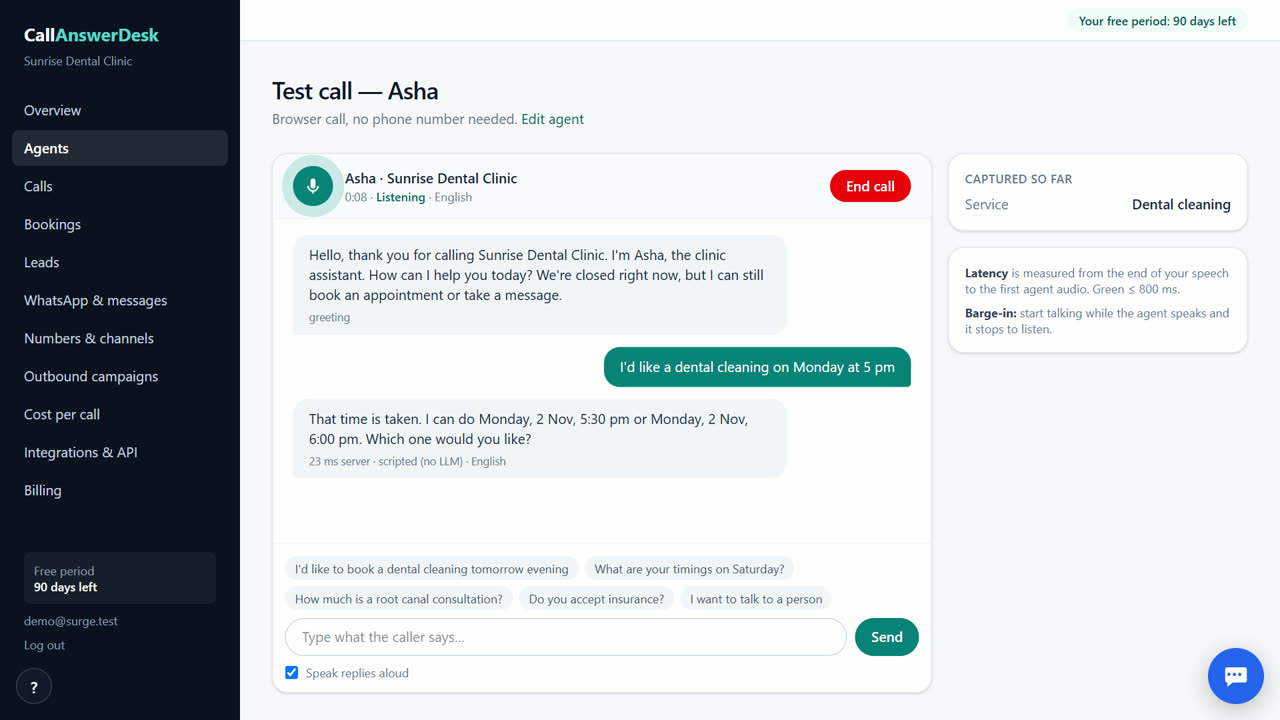
Book appointments without conflicts
The AI checks your built-in calendar before saving any booking. If a slot is taken, it offers the next free time. This prevents double-booking patients for cleanings, check-ups, or root-canal consultations. You do not need to connect Google Calendar or Outlook yet. The system uses its own calendar to keep your schedule accurate. You can also save a Calendly link, though sending it via WhatsApp is not available yet.
Answer price and service questions
Patients often ask about costs before booking. Your receptionist answers these questions using the services and prices you add in the Agents page. It tells them what a cleaning or consultation costs in plain English. If it does not know the answer, it takes a message with the patient's name and number. You get an email alert for every message so you can reply personally. This stops you from missing enquiries while you are with a patient.
Test it before you launch
You can talk to your receptionist in the browser before adding it to your website. Use the test call page to try voice or text. Test calls are free and do not cost you anything. You can also visit the public demo at /demo to hear how it sounds for a sample dental clinic. This lets you check the tone and accuracy of the answers. You can edit the greeting and FAQs in the Agents page until it sounds right for your practice.
Track leads and quality
Every conversation gets a transcript and an AI summary. The system gives each conversation a quality score from 0 to 100. It also marks leads as hot, warm, or cold based on their intent. You can export this data to CSV. This helps you see which services patients ask about most. It also shows you if the AI is answering correctly. You can review these details in the Conversations page to improve your knowledge base.
When CallAnswerDesk is not the right tool
CallAnswerDesk is not for businesses that need real phone calls answered on their own number today. It also does not support WhatsApp replies or live transfer to staff yet. If you need these features now, look at Goodcall or fonio. CallAnswerDesk works best for clinics that want to handle web chats and browser voice calls first, and are okay waiting for phone number integration.
Questions
Does it work with my existing calendar?
No, it uses its own built-in calendar today. Google Calendar and Outlook sync are coming soon. You can save a Calendly link, but it is not sent via WhatsApp yet.
Can it answer my phone line?
Not yet. It works as a chat on your website and as voice calls in the browser. Real phone calls on your own number are coming soon.
How much does it cost after 3 months?
You pay only for what you use, at our cost. Web chats are free. Phone calls, once live, cost about ₹2.13 to ₹2.64 a minute (est.) depending on the carrier. There is no subscription fee.
Can I test it before signing up?
Yes. Visit the public demo at /demo. You can talk to a sample dental clinic receptionist using voice or text without creating an account.
Related
Free for your first 3 months. Then pay only for what you use.
Start free — 3 months on us