Quality and lead scores for every conversation
Last updated 2026-11-01 · by Venu Gopal Reddy Muvva, founder
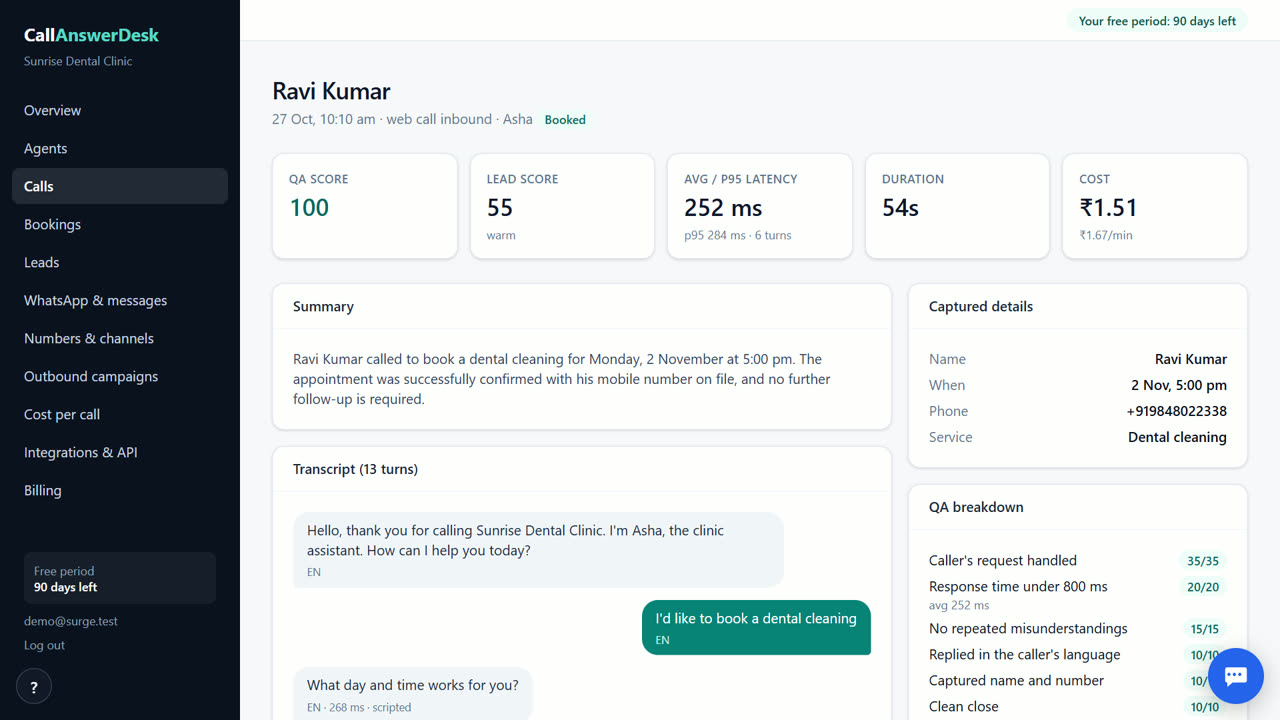
Every conversation gets a quality score from 0 to 100 and a lead score of hot, warm, or cold. You can read the full transcript, an AI summary, and the specific reasons for each score in the Conversations tab.
Steps
- Open Conversations. Go to the Conversations page in your dashboard to see a list of all recent chats and calls.
- View the transcript. Click on a specific conversation to read the full written record of what was said.
- Check the scores. Look at the quality score (0-100) and lead score (hot, warm, or cold) displayed for that interaction.
- Read the reasons. Review the bullet points that explain why the AI gave that specific quality and lead score.
- Read the summary. Read the short AI summary that highlights the main topics and outcomes of the conversation.
How the quality score works
Every conversation receives a quality score between 0 and 100. This number helps you understand how well the AI receptionist handled the interaction. It looks at factors like whether the AI answered correctly, stayed on topic, and followed your business rules. You do not need to guess if the AI performed well. The score is visible on the conversation details page. If the score is low, the system provides specific reasons. This lets you fix the issue in your knowledge base or flow builder. You can track these scores over time to see if your setup is improving.
Understanding lead scores
The system marks each visitor as a hot, warm, or cold lead. A hot lead is likely to book or buy soon. A warm lead is interested but needs more time. A cold lead is just browsing or asking general questions. The AI decides this based on the conversation content. For example, if someone asks for a specific appointment time, they are likely hot. If they only ask about prices, they might be warm. You see the lead score next to the quality score. This helps you prioritize who to contact first. You can export this data to see which types of questions lead to bookings.
Transcripts and summaries
You get a full transcript for every chat and call. This is the exact text of what was said. It is useful for checking details or training your AI. Alongside the transcript, you get an AI summary. This is a short paragraph that captures the main points. It tells you what the customer wanted and what the outcome was. You do not have to read the whole transcript to understand the conversation. The summary saves you time. Both the transcript and summary are available immediately after the conversation ends. You can open them any time from Conversations.
Where to find this data
All this information lives in the Conversations tab of your dashboard. Click on any conversation to open its details page. You will see the transcript, the AI summary, the quality score, and the lead score. The reasons for the scores are listed clearly. You can also find this data in the Leads tab, which focuses on potential customers. The Leads tab shows the lead score and allows you to export the list as a CSV file. This is helpful if you want to use the data in other tools. The data is accurate and updates in real time as conversations happen.
When CallAnswerDesk is not the right tool
CallAnswerDesk is not for businesses that need to record calls for legal compliance or insurance purposes. It does not offer call recording or voicemail features yet. If you require a human agent to handle complex complaints or sensitive medical advice, this tool is not a replacement. It is best for routine questions and booking. For those needs, consider hiring a virtual assistant or using a traditional call center service.
Questions
Can I change how the AI scores conversations?
No, the scoring logic is fixed by the system. However, you can improve the scores by adding more accurate information to your knowledge base and adjusting your conversation flows. The AI scores based on the rules you provide.
Do I get the transcript for voice calls?
Yes, you get a full text transcript for every voice call in the browser. The system converts the audio to text automatically. You can read it in the conversation details page just like you would for a web chat.
What does a hot lead mean?
A hot lead is a visitor who showed strong intent to book or buy. They likely asked specific questions about availability or pricing. The AI marks them as hot so you know to follow up quickly. Warm and cold leads have less immediate intent.
Can I export the lead scores?
Yes, you can export your leads and their scores as a CSV file. Go to the Leads tab and use the export button. The file has each lead's name, phone number, stage (hot, warm or cold), score, what they asked about, and the date. It is useful for tracking your pipeline.
Related
Free for your first 3 months. Then pay only for what you use.
Start free — 3 months on us