How to stop missing customer enquiries
Last updated 2026-11-01 · by Venu Gopal Reddy Muvva, founder
CallAnswerDesk stops you from missing enquiries by answering website chats instantly and taking messages when you are busy. It emails you every booking and message so nothing is lost. Phone calls and WhatsApp replies are coming soon.
Steps
- Start free sign-up. Go to the signup page and press Start free. Enter your name, email, and password. No card is needed. Your 3-month free period starts immediately.
- Set up your business. On the set-up page, pick your business type like clinic or salon. Add your hours, services, and FAQs. You can also try a sample dental clinic to see how it works.
- Test your receptionist. Go to the test call page. Press Start voice call to talk or Type instead to chat. Try booking an appointment. This shows you how the AI handles real questions.
- Add the web chat. Open Numbers & channels. Copy the script tag and paste it into your website. A chat bubble appears so visitors can talk to your AI receptionist anytime.
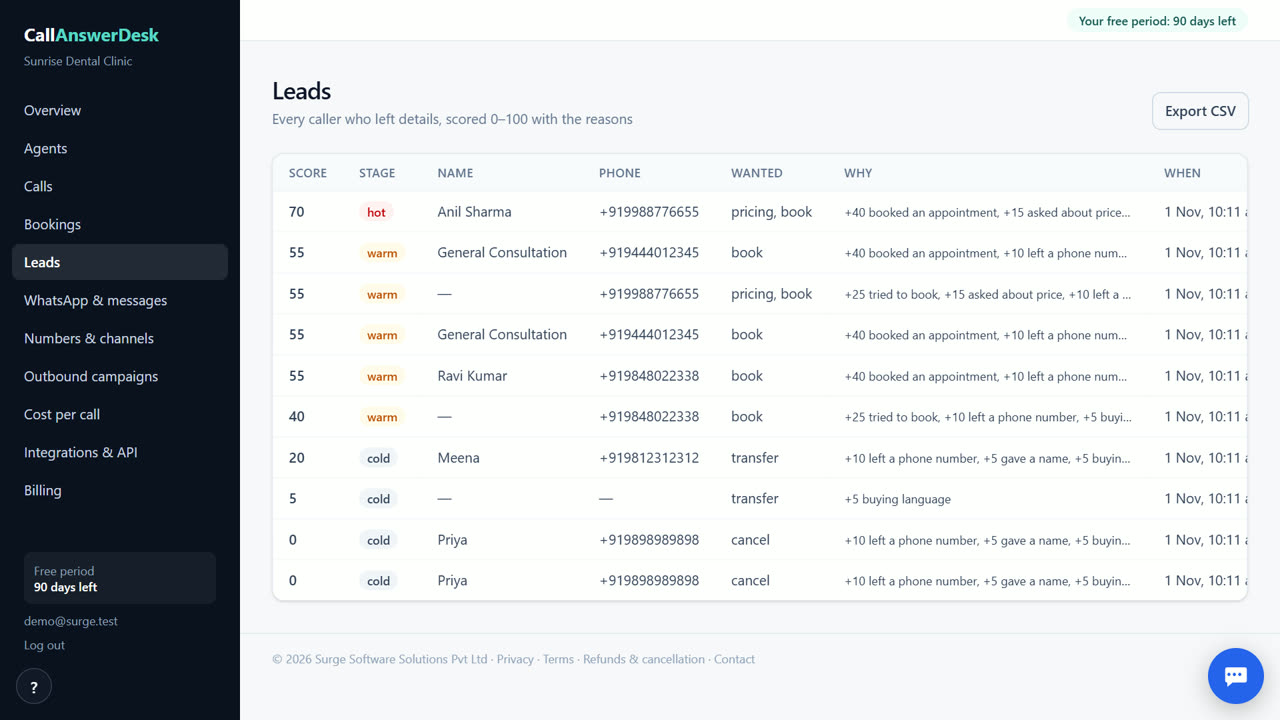
- Review leads and bookings. Check the Leads page to see who contacted you. Each lead has a score and a CSV export option. You also get an email for every new booking or message.
Answer every visitor instantly
When a customer visits your website, the chat widget answers them right away. It knows your hours, prices, and services because you added them during setup. This means you do not have to stop your work to reply. The AI handles common questions like 'are you open' or 'how much does it cost'. If it cannot answer, it takes a message with the customer's name and number. This ensures no enquiry is lost because you were busy with a client or a patient.
Get notified by email
Every time the AI books an appointment or takes a message, it sends you an email. You do not have to check the dashboard constantly. You can turn on a daily summary email to see all activity in one place. This keeps you in the loop without interrupting your day. The emails include the details of the booking or the content of the message. This way, you can follow up with the customer quickly. You stay in control of your business while the AI handles the first contact.
Track and export leads
The Leads page shows every person who contacted you. Each lead gets a score: hot, warm, or cold. This helps you know who to call first. You can see the full transcript of the conversation to understand what they wanted. If you use other tools, you can export the leads to a CSV file. This makes it easy to move your data into a spreadsheet or another system. You always have a record of who reached out and what they said.
What is coming soon
Today, CallAnswerDesk works as a chat on your website and as voice calls in the browser. It does not answer real phone calls on your own number yet. It also does not reply to WhatsApp messages yet. These features are coming soon. Until then, you can still capture web enquiries and test voice calls in the browser. For now, the web chat is the main way to stop missing online enquiries.
When CallAnswerDesk is not the right tool
CallAnswerDesk is not the right tool if you need real phone calls answered on your own number today. It also does not handle WhatsApp messages yet. If you need live human transfer or call recording, you should look at services like Smith.ai or Goodcall. Those tools offer phone support and human backup now. CallAnswerDesk is best for businesses that want to capture web enquiries and test AI voice without a monthly fee.
Questions
Does it answer my phone calls?
No, not yet. It works as a chat on your website and as voice calls in the browser. Real phone calls on your own number are coming soon.
How do I get notified about new bookings?
You get an email for every booking and message. You can also turn on a daily summary email to see all activity in one place.
Can I export my leads?
Yes. The Leads page has a button to export all your leads to a CSV file. This lets you move your data into other tools.
What happens after the free 3 months?
You pay only for what you use, at our cost. There is no subscription. Today, web chats and browser test calls are free, so you pay nothing until phone and WhatsApp are live.
Related
Free for your first 3 months. Then pay only for what you use.
Start free — 3 months on us